TL;DR: Agent Skills brings SDK-aware AI assistance to Syncfusion PDF Viewer integration, helping developers generate accurate, production‑ready code with correct initialization, licensing, and feature wiring across web, mobile, and .NET platforms, reducing AI hallucinations, speeding development, and improving reliability and maintainability.
AI coding assistants have become part of everyday development workflows. They can scaffold components, suggest patterns, and speed up routine tasks. But when it comes to integrating complex UI components like a PDF Viewer SDK, that convenience often breaks down.
PDF Viewer integration is rarely a single‑line setup. It involves platform‑specific initialization, mandatory license and service registration, and feature‑level configuration that must align perfectly with the SDK’s expectations. Generic AI tools don’t understand these constraints, and that gap shows up quickly as runtime errors, broken features, or partially wired viewers.
This is where Syncfusion’s PDF Viewer Agent Skills make a practical difference.
Agent Skills brings official, SDK-aware knowledge directly into AI assistants, allowing them to generate accurate, production-ready PDF Viewer integrations instead of guesswork-driven code.
Why generic AI struggles with PDF Viewer SDK integration
Most AI coding tools are trained to recognize patterns, not SDK‑specific integration rules. That limitation becomes obvious when working with UI components like PDF Viewers.
SDK setup isn’t optional
PDF Viewer components are not drop‑in widgets. They require:
- Correct initialization order
- Mandatory license or service registration
- Framework‑specific imports and service wiring
Missing or misordering any of these steps leads to runtime failures, something generic AI rarely anticipates.
Platform differences
- Each framework uses a distinct integration model. React component patterns do not apply to Blazor or MAUI service registration.
- Generic AI mixes platform code patterns, producing incompatible code.
Feature configuration dependencies
- PDF Viewer features are configuration‑sensitive, requiring explicit enabling, supporting service, or module registration for features.
- Generic AI often enables UI features without wiring the supporting services, creating features that appear active but fail in behavior.
Developer impact
- Developers often spend significant time fixing incorrect or incomplete code generated during AI‑assisted PDF Viewer integration.
- Developers must repeatedly test, debug, and re‑prompt AI to resolve runtime issues
How Syncfusion PDF Viewer Agent Skills work
Syncfusion PDF Viewer AI Agent Skills act as a knowledge layer between the AI assistant and the Syncfusion PDF Viewer SDK.
At the core of this system are structured SKILL.md files, each containing verified, platform-specific SDK knowledge aligned to a specific framework and version.
When a developer prompts an AI assistant about PDF Viewer integration:
- The relevant Agent Skill is automatically detected
- The AI reads the SDK-accurate definitions from the skill file
- Correct APIs, initialization order, configuration rules, and dependencies are injected into the response
- The AI generates framework‑correct, production‑ready code
These skills guide AI output only. They don’t add runtime dependencies, modify project files, or affect build pipelines. The benefit is purely at development time, better code from the first prompt.
Supported platforms with a single skill architecture
Syncfusion PDF Viewer AI Agent Skills support 12 platforms, each with its own dedicated skill definition to ensure framework‑specific correctness.
| Category | Platforms |
| Web |
|
| Mobile & Cross-platform | |
| Desktop |
These skills are published in the Syncfusion PDF Viewer SDK skills GitHub repository. You can install only the skills required for their stack, avoiding unnecessary setup. Once agent skills are added, supported AI tools automatically load the skills for every Syncfusion PDF Viewer request.
For advanced Blazor scenarios, Syncfusion Blazor Smart PDF Viewer is available as a specialized AI‑assisted PDF Viewer.
What PDF Viewer Agent Skills fix in real-world development
With SDK-aware guidance in place, Agent Skills directly address the most common AI integration failures.
- SDK-accurate code generation
Hallucinated APIs, deprecated configurations, and incorrect syntax are eliminated before they reach your codebase. The AI generates output aligned with the current version of the Syncfusion PDF Viewer SDK. - Correct initialization every time
Agent Skills enforce the correct sequence, license registration, service injection, and viewer setup automatically for each platform, without manual cross-checking. - Feature-safe configuration
Annotations, toolbar customization, form filling, search, and redaction require specific configuration rules. Agent Skills ensure features that appear in the UI are fully functional at runtime, not just visually enabled. - Faster and more reliable iterations
With fewer prompt retries and less debugging, developers move from idea to working PDF Viewer integration faster, especially when adding new features to existing viewers.
Seeing the difference: Generic AI vs Agent-Skilled AI
Prompt: “Initialize Syncfusion React PDF Viewer with annotation and form-fields Toolbar.”
Generic AI often:
- Misses required services
- Uses incorrect imports
- Produces code that compiles but fails at runtime
Agent‑skilled AI:
- Generates correct imports
- Applies required services
- Produces runnable, SDK‑accurate code aligned with official patterns
This side‑by‑side contrast highlights why SDK awareness matters more than generic code generation.
Below is the output for the above prompt, generated by AI with and without skills.
Getting Started with Syncfusion PDF Viewer Agent Skills
Starting with Syncfusion PDF Viewer Agent Skills requires minimal setup:
Prerequisites
- A valid Syncfusion PDF Viewer SDK license.
- An AI assistant that supports Agent Skills (GitHub Copilot, Cursor, Claude, Code Studio, etc.).
- A project where the Syncfusion PDF Viewer SDK is planned or already referenced.
Setup
- Download the Agent Skills from the Syncfusion PDF Viewer SDK skills GitHub repository.
- Copy the required
SKILL.mdfiles into your project workspace.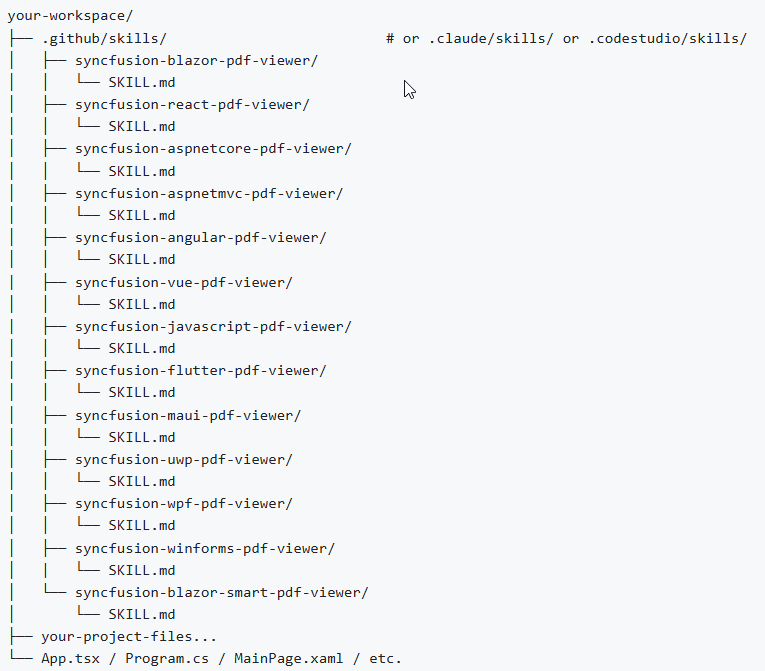
Workspace structure for Syncfusion PDF Viewer Agent Skills - Open the workspace in your AI tool.
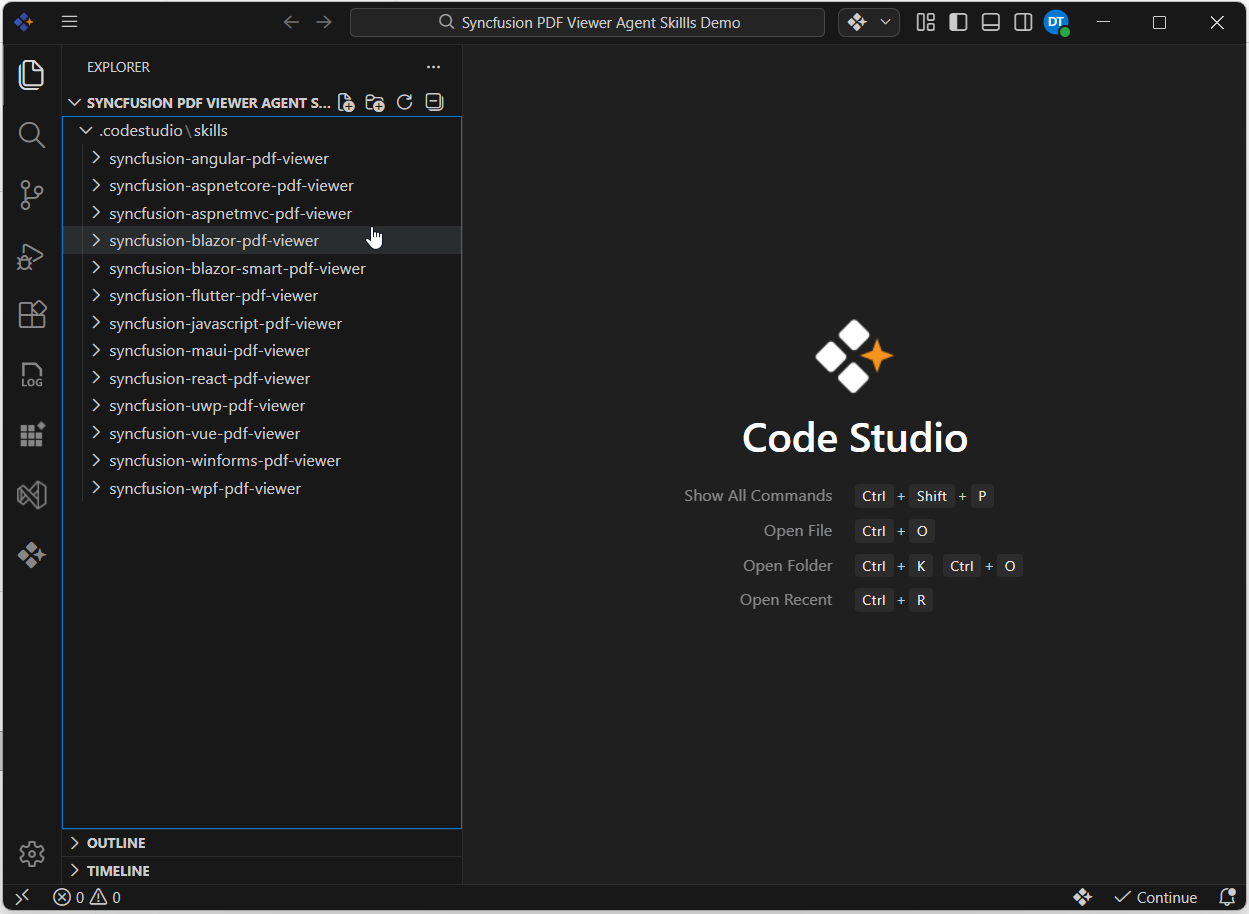
Code Studio workspace with Syncfusion PDF Viewer SDK skills
From that point onward, PDF Viewer‑related prompts automatically benefit from SDK-accurate guidance; no manual activation required.
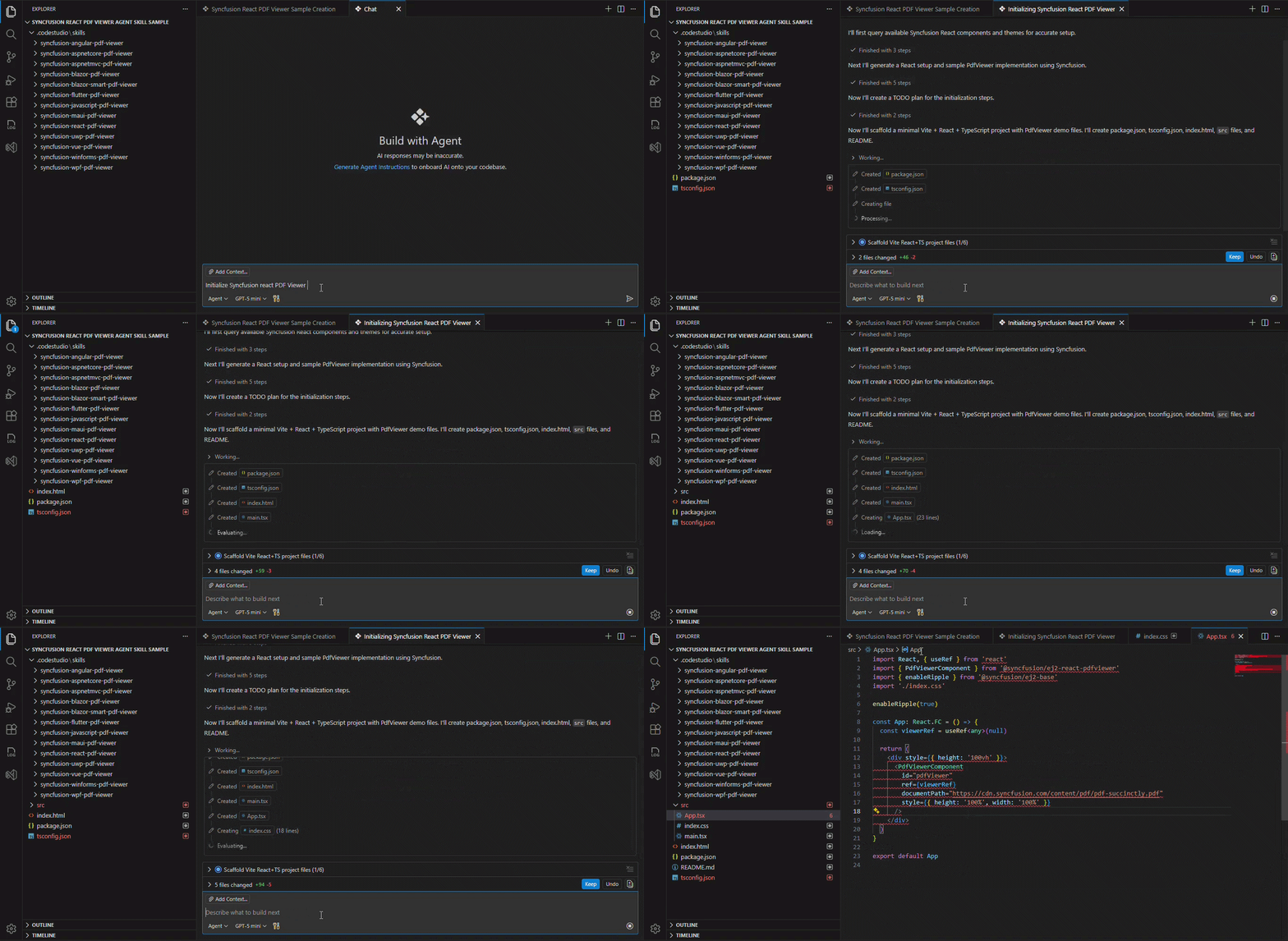
Let’s see how this plays out in practice by walking through a React PDF Viewer integration, one of the most common and error‑prone scenarios for generic AI.
A practical example: React PDF Viewer integration
Once Agent Skills are loaded, prompting the AI to initialize a React PDF Viewer result in code that includes:
- Correct Syncfusion styles
- Required services for annotations, navigation, form fields, and search
- Proper viewer initialization and configuration
For example, Prompt “Initialize Syncfusion React PDF Viewer” generate below code,
// Syncfusion theme and base styles (material)
import '@syncfusion/ej2-base/styles/material.css'
import '@syncfusion/ej2-buttons/styles/material.css'
import '@syncfusion/ej2-popups/styles/material.css'
import '@syncfusion/ej2-react-pdfviewer/styles/material.css'

// Imported required services
import {
    PdfViewerComponent,
    Toolbar,
    Magnification,
    Navigation,
    LinkAnnotation,
    BookmarkView,
    ThumbnailView,
    Print,
    TextSelection,
    Annotation,
    TextSearch,
    FormFields,
    FormDesigner,
    Inject
} from '@syncfusion/ej2-react-pdfviewer';

function App() {
    return (
        <div>
            <div className="control-section">
                {/* Render the PDF Viewer */}
                <PdfViewerComponent
                    id="container"
                    documentPath="
                    resourceUrl="
                    style={{ 'height': '640px' }}
                >
                    // Added required services for PDF Viewer
                    <Inject
                        services={[
                            Toolbar,
                            Magnification,
                            Navigation,
                            Annotation,
                            LinkAnnotation,
                            BookmarkView,
                            ThumbnailView,
                            Print,
                            TextSelection,
                            TextSearch,
                            FormFields,
                            FormDesigner
                        ]}
                    />
                </PdfViewerComponent>
            </div>
        </div>
    );
}
Instead of debugging incomplete setups, developers receive working code that reflects official SDK requirements. You can explore the Syncfusion PDF Viewer AI agent skills documentation and generate accurate PDF Viewer codes.
Frequently Asked Questions
What problem do PDF Viewer Agent Skills solve for AI-assisted development?
Agent Skills prevent AI tools from guessing SDK behavior by injecting verified Syncfusion PDF Viewer knowledge, ensuring correct initialization, configuration, and feature wiring from the first prompt.
How are Agent Skills different from using documentation with AI prompts?
Documentation is written for humans and requires interpretation. Agent Skills uses structured SKILL.md definitions that AI tools can read directly, eliminating ambiguity and reducing incorrect assumptions in generated code.
Do Agent Skills support existing projects or only new integrations?
Agent Skills work at any stage: initial setup, adding new features like annotations or form fields, or refining an existing PDF Viewer without reworking prior integrations.
Are Agent Skills tied to a specific AI tool or IDE?
No. Agent Skills work with any AI assistant that supports skill or context loading, including GitHub Copilot, Cursor, Claude, and similar development‑focused AI environments.
Do Agent Skills affect build size, runtime behavior, or CI/CD pipelines?
No. Agent Skills influence only AI‑generated output during development. They introduce no runtime dependencies and have no impact on builds or deployment pipelines.
How do Agent Skills handle differences across frameworks like React, Blazor, and MAUI?
Each platform has a dedicated skill definition that encodes framework‑specific APIs, services, and setup rules, ensuring the AI generates code that follows the correct conventions for that platform.
What happens if multiple Agent Skills are present in a project?
AI tools resolve skills based on prompt relevance and platform scope. Keeping only the required platform skills in the workspace helps avoid conflicting guidance.
What should I check if the AI isn’t using the Agent Skills?
Ensure the SKILL.md files are located inside the active project root opened in the AI tool. Skills outside the scanned workspace will not be detected.
Conclusion
Thank you for reading! Generic AI is powerful, but it isn’t designed to understand the integration rules of complex UI SDKs. That gap becomes costly when integrating components like a PDF Viewer.
Syncfusion PDF Viewer Agent Skills close this gap by grounding AI output in verified, platform‑specific SDK knowledge. The result is more accurate code, fewer runtime failures, and a smoother development experience across web, mobile, and desktop platforms.
If your team relies on AI to speed up development, adopting Agent Skills before your next PDF Viewer integration ensures AI helps you build features, not debug setup mistakes.
For queries, you can contact us through our support forum, support portal, or feedback portal. We are always happy to assist you!
PakarPBN
A Private Blog Network (PBN) is a collection of websites that are controlled by a single individual or organization and used primarily to build backlinks to a “money site” in order to influence its ranking in search engines such as Google. The core idea behind a PBN is based on the importance of backlinks in Google’s ranking algorithm. Since Google views backlinks as signals of authority and trust, some website owners attempt to artificially create these signals through a controlled network of sites.
In a typical PBN setup, the owner acquires expired or aged domains that already have existing authority, backlinks, and history. These domains are rebuilt with new content and hosted separately, often using different IP addresses, hosting providers, themes, and ownership details to make them appear unrelated. Within the content published on these sites, links are strategically placed that point to the main website the owner wants to rank higher. By doing this, the owner attempts to pass link equity (also known as “link juice”) from the PBN sites to the target website.
The purpose of a PBN is to give the impression that the target website is naturally earning links from multiple independent sources. If done effectively, this can temporarily improve keyword rankings, increase organic visibility, and drive more traffic from search results.