TL;DR: Edit and sign document workflows solve the biggest failures in e‑signature systems by keeping DOCX preparation in the browser. This article explains how JavaScript apps can handle template filling, controlled edits, tracked changes, document locking, and signing‑ready export, reducing rework, preventing errors, and delivering reliable, audit‑ready documents before signature.
Most problems in e‑signature workflows don’t happen during signing. They happen earlier when incomplete or incorrectly edited documents are pushed into a legally binding flow.
A wrong name, a missing date, an unresolved clause, these issues usually slip through because document preparation happens outside the application. Teams download a DOCX, edit it locally, upload it again, and repeat the cycle. Each handoff introduces version drift, formatting changes, and approval gaps long before a signer ever sees the document.
An edit-before-sign workflow fixes this by keeping document preparation, review, approval, and locking inside the browser before any signing request is created.
This article explains how JavaScript applications can implement that workflow using the in-browser Syncfusion® JavaScript DOCX Editor, so the document sent for signature is exactly the document that was reviewed and approved.
What an edit and sign workflow looks like
A well-designed edit-before-sign workflow keeps every stage inside the application, with no downloads, no desktop tools, and no file re-uploads.
Typical flow:
Template Load → Data Fill → Review & Edit → Document Lock → Send for Signature
Each step maps to a concrete technical capability:
- Template load: DOCX templates open directly in the browser, with layout, styles, tables, headers, and sections preserved.
- Data fill: Business data like names, dates, values, and conditional clauses is injected programmatically into predefined fields.
- Review & edit: Users revise content in context. Changes are visible, tracked, and attributed.
- Document lock: Once approved, editing is restricted to prevent further modification.
- Send for signature: The finalized document is exported as a signing‑ready DOCX or PDF and passed to the e‑signature API.
The key outcome: the document that reaches signers is already complete, verified, and locked.
Why download and reupload cycles break pre-sign workflows
The moment a document leaves the application, control is lost.
Local edits introduce unknown changes, layout regressions, and untracked revisions. Browser editors that rely on simplified HTML rendering add another layer of risk: tables break, fields disappear, and formatting no longer matches the final export.
For enterprise signing workflows, that uncertainty is unacceptable.
A reliable pre‑sign workflow requires:
- High-fidelity DOCX rendering that matches print and export output
- Structured, restricted data entry through form fields
- Full revision tracking with author attribution
- Enforceable document protection before export
- Verified DOCX and PDF export suitable for legally binding signing flows
That’s the foundation on which the Syncfusion JavaScript DOCX Editor is built, covering the entire pre-sign stage without pushing users out of the application.
Embed a JavaScript DOCX Editor for pre-sign workflows
Pre-sign workflows demand accuracy, control, and reliability, especially when documents move directly into legally binding signature flows.
The Syncfusion JavaScript DOCX Editor can be embedded directly into a web app to support viewing, editing, and reviewing before signing. Once initialized, documents render with full layout fidelity, no downloads or external tools required.
The example below shows the minimal setup required to run a JavaScript DOCX editor as part of a pre-sign document workflow.
<!DOCTYPE html>
<html>
    <head>
        <title>In App DOCX Editing</title>

        <!-- Syncfusion Styles and Script -->
        <link href=" rel="stylesheet">
        <script src="
    </head>

    <body>
        <!-- Container for the DOCX Editor -->
        <div id="DocumentEditor" style="height:620px;"></div>

        <script>
            // Inject toolbar support
            ej.documenteditor.DocumentEditorContainer.Inject(
                ej.documenteditor.Toolbar
            );

            // Initialize the Document Editor
            const documentEditor = new ej.documenteditor.DocumentEditorContainer({
                enableToolbar: true,
                height: '590px'
            });
            documentEditor.serviceUrl="

            // Render the editor in the application
            documentEditor.appendTo('#DocumentEditor');
        </script>
    </body>
</html>
This gives you a fully functional in-browser editor with toolbar support. From here, each stage of the pre-sign workflow builds on this initialized instance.
Ready to bring in‑app DOCX editing into your workflow? Explore the Syncfusion JavaScript DOCX Editor documentation for complete setup.
Controlled data entry with form fields
Signing templates are structurally fixed. Only specific values: names, dates, amounts, and selections should change per document.
Form fields enforce that structure in code rather than by convention.
With text, checkbox, and dropdown fields:
- Templates load with predefined editable fields
- Only those fields remain editable; all other content stays protected
- Values can be pre‑filled from backend systems
- Field data can be extracted after completion for automation
- Mail merge supports batch document generation
Every signing request that exists at this stage is accurate, complete, and structurally protected before it ever touches the signing platform.
// Set text form field properties
let textfieldInfo: TextFormFieldInfo =
    documentEditor.getFormFieldInfo('Text1') as TextFormFieldInfo;
textfieldInfo.defaultValue = "Hello";
textfieldInfo.format = "Uppercase";
textfieldInfo.type = "Text";
textfieldInfo.name = "Text2";
documentEditor.setFormFieldInfo('Text1', textfieldInfo);Before your next signing request goes out with the wrong name or a blank date field, try the Syncfusion JavaScript DOCX Editor live demo.
Track changes for review and approval
In legal, HR, finance, and compliance workflows, approvals must be visible and auditable. Track changes keeps the review inside the document:
- Edits appear inline and in context
- Every change is attributed to an author
- Revisions can be accepted or rejected individually or in bulk
- Permissions restrict who can approve changes
By the time the review ends, every modification has been explicitly accepted or rejected; no assumptions, no hidden edits.
var container = new ej.documenteditor.DocumentEditorContainer({
    enableTrackChanges: true
});
container.appendTo('#container');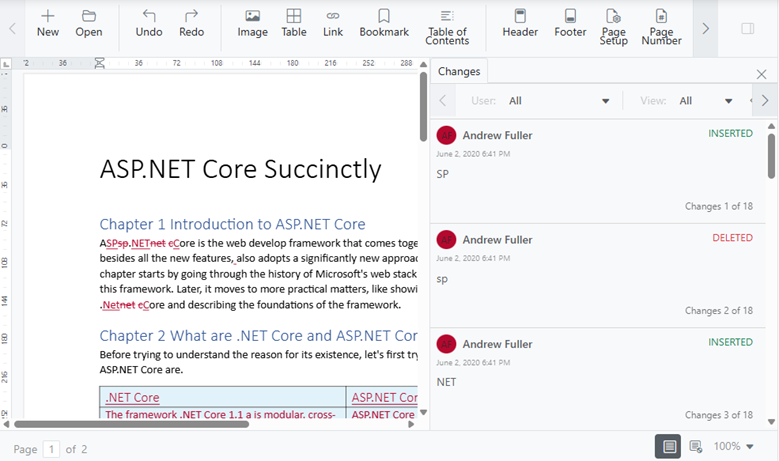
Document protection before export
Once a document is approved, further editing should stop.
Document protection enforces that boundary:
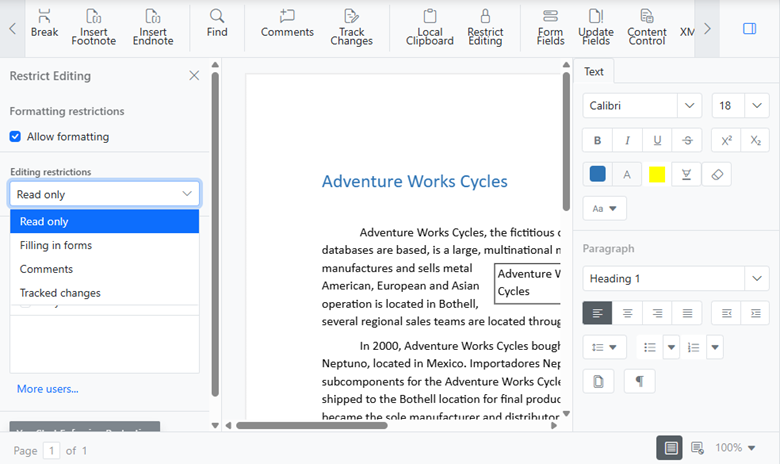
After locking, the exported DOCX or PDF is structurally identical to the reviewed version, ready to be sent for signature without further cleanup.
Sending the final document for signature
When pre‑sign steps are complete, the finalized document is exported and handed off to the e‑signature platform via API.
There’s no conversion pipeline, no re‑upload step, and no ambiguity about what changed. The signing service receives exactly what was approved.
Where edit-before-sign fits in real applications
This workflow applies anywhere documents must be accurate and auditable before signatures are collected:
- Contract lifecycle management: Structured templates, tracked negotiations, locked final contracts
- HR onboarding: Offer letters generated from data, reviewed, and signed with a full audit trail
- Procurement systems: Controlled clause edits and approvals before vendor signatures
- Legal and compliance platforms: Verified language with complete revision history
- Healthcare consent apps: In‑browser review without exposing files outside the system
- Finance workflows: Approval documents finalized before signing requests are issued
Frequently Asked Questions
Why does a DocuSign integration need an edit-before-sign stage?
DocuSign is designed to collect signatures, not to prepare documents. An Edit‑before‑sign stage ensures documents are reviewed, finalized, and structurally locked before entering a legally binding signing flow.
Can I pre-fill DOCX templates from backend data before sending for signature?
Yes. The DocumentEditorContainer API supports programmatic pre‑filling of form fields from backend systems and extracting values after completion for automated workflows.
How does the editor handle complex DOCX layouts like nested tables or multi‑column sections?
The Syncfusion editor uses a DOCX‑native (Syncfusion Document Text – JSON-based document format) rendering engine, not HTML, ensuring complex layouts render accurately in-browser and in the exported file.
Can the exported DOCX be used directly with the e‑signature API?
Yes. The editor exports signing‑ready DOCX or PDF files that can be passed directly to an e‑signature service’s REST API without additional conversion or cleanup.
Are these conflicts specific to Angular, or common across web spreadsheets?
While this post focuses on Angular, similar conflicts can occur in other web spreadsheet implementations when rendering, filtering, and virtualization are not tightly coordinated.

Try It Free
Conclusion: Build trust before the signature
Thank you for reading! Signing failures almost never begin at the signature step. They begin when documents are sent out before they’re truly ready.
By embedding a Syncfusion JavaScript DOCX Editor into your application, you can handle document preparation, review, approval, and locking before any e‑signature integration is triggered.
The result is fewer resends, faster cycles, stronger audit trails, and documents that are reliable from the moment they’re created, not just after they’re signed.
If you’re a Syncfusion user, you can download the setup from the license and downloads page. Otherwise, you can download a free 30-day trial.
You can also contact us through our support forum, support portal, or feedback portal for queries. We are always happy to assist you!
PakarPBN
A Private Blog Network (PBN) is a collection of websites that are controlled by a single individual or organization and used primarily to build backlinks to a “money site” in order to influence its ranking in search engines such as Google. The core idea behind a PBN is based on the importance of backlinks in Google’s ranking algorithm. Since Google views backlinks as signals of authority and trust, some website owners attempt to artificially create these signals through a controlled network of sites.
In a typical PBN setup, the owner acquires expired or aged domains that already have existing authority, backlinks, and history. These domains are rebuilt with new content and hosted separately, often using different IP addresses, hosting providers, themes, and ownership details to make them appear unrelated. Within the content published on these sites, links are strategically placed that point to the main website the owner wants to rank higher. By doing this, the owner attempts to pass link equity (also known as “link juice”) from the PBN sites to the target website.
The purpose of a PBN is to give the impression that the target website is naturally earning links from multiple independent sources. If done effectively, this can temporarily improve keyword rankings, increase organic visibility, and drive more traffic from search results.